


Dave’s Hot Chicken®
3.3928.00 Reviews
App Specs
- Version
- 5.3.7
- Updated On
- License
- Free
- Downloads
- 500,000+
- Developer
- Dave's Hot Chicken
- Categories
- Food & Drink
- Platform
- Android
Screenshots

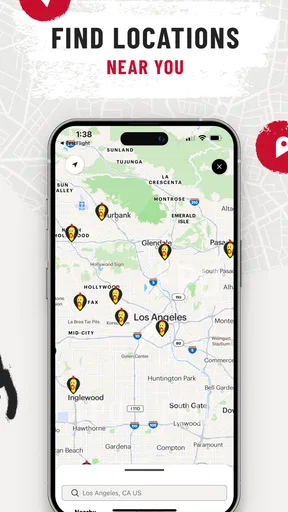
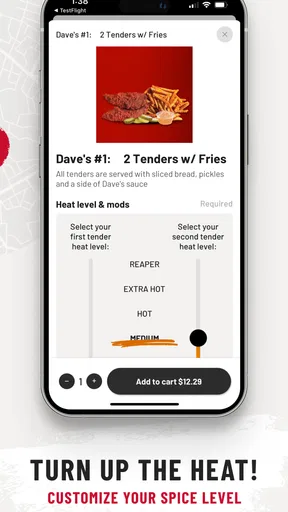
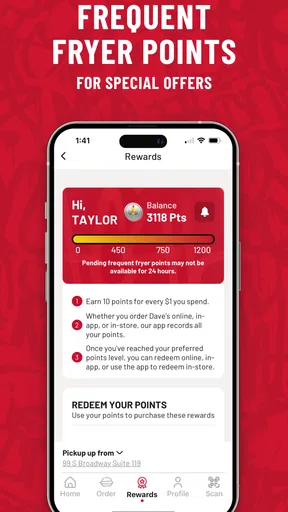
 Analysis by AppCompare
I used Dave’s Hot Chicken® as a companion for browsing the chain’s food options, and my overall impression is fairly simple: it is most useful when I already know I want Dave’s and need a direct way to explore the menu or plan a visit. It is a free Food & Drink app from Dave’s Hot Chicken, but it is not the kind of download that replaces a general restaurant app for every meal. Its value depends heavily on how often this particular restaurant is part of your routine.
The app is aimed at people interested in hot chicken, tenders, sliders, fries, and related menu choices. That focus is both its main strength and its biggest limitation. I would not install it just to discover restaurants in a new city, compare several chicken chains, or manage every food order from one place. I would consider it when Dave’s is nearby, when I want to look over the choices before arriving, or when I prefer checking the restaurant’s own mobile experience instead of relying on a broader delivery platform.
How the app fits into an actual Dave’s Hot Chicken visit
I use the app as a quick planning step before a visit, rather than something I need open throughout the meal. In this section, I’ll look at how checking the menu ahead can help with a real order, especially when other people are choosing too, and where I would still switch to a broader tool for practical details.
A focused menu tool rather than a general food platform
The first thing I noticed is how narrowly the app is built around one restaurant brand. That makes the experience easier to understand than a crowded marketplace, because I am not sorting through unrelated restaurants, sponsored listings, or dozens of cuisines. If I have already decided on Dave’s Hot Chicken, the app gives me a more direct starting point for thinking about the meal.
That focus also means I need to set the right expectations. This is not a broad restaurant-discovery service, and it should not be judged as though it were one. The useful question is not whether it can replace every food app on my phone. The useful question is whether it makes choosing Dave’s food more convenient than checking a browser page, asking someone else what is available, or making a decision at the counter while a queue is moving.
For a quick lunch, I found the most sensible workflow was to open the app before leaving, review the available chicken format I wanted, and decide whether I was leaning toward tenders, sliders, fries, or a combination. That small amount of preparation matters when I am hungry and do not want to study a menu while standing in a busy restaurant. It also makes group ordering conversations easier: I can show someone the relevant choices instead of trying to describe everything from memory.
What the free download means in practice
The app is free to download, so there is no purchase barrier just to test it. That is important when judging its value. I am not paying for the software itself; the financial decision comes later, when I choose food from the restaurant. In other words, the app can be useful even if I only install it temporarily, but it does not make the meal free or automatically cheaper.
Worth Reading Before You Choose

EA SPORTS FC Mobile 26 Is a Bigger Football Game, but It Takes Time

Flipboard Shows What News Apps Must Do Beyond the Feed

Switching to Android Auto Means Rethinking Your Driving Routine

Google Calendar Makes a Crowded Week Easier to Manage

Ludo King Makes the Most of the Minutes Between Plans

Baby Panda World Brings Quick Play to Modern Phones, but Its Game Library Feels Busy
I appreciate that distinction because food apps can blur the line between free access and savings. Here, I would treat the download as a convenience tool, not as proof of a discount, reward, or special deal. If my goal is strictly to spend less, I would compare the final food cost and any available ordering choices before assuming that using the app delivers a better bargain than ordering another way.
The app is listed for Everyone and runs on Android versions from 8.0 onward. That gives it a reasonably broad audience among Android users, including people who keep an older phone for everyday tasks. The current version is 5.3.7, which suggests the app is maintained as an ongoing product rather than being a one-time menu brochure. Still, a current version number alone does not guarantee that every screen will feel equally polished on every device, so I would keep expectations practical.
Checking choices before hunger takes over
One of the more useful habits I developed was using the app as a pre-visit decision screen rather than waiting until I was ready to place an order. Hot chicken menus can look straightforward, but the choice between a tender-based meal, sliders, fries, and a larger combination can become surprisingly slow when several people are ordering together.
For example, imagine leaving work with two colleagues. One person wants something easy to eat, another wants a sandwich-style option, and I want chicken with fries. Opening the app on the way lets us settle the broad choices before reaching the restaurant. That does not eliminate every decision, but it reduces the back-and-forth that usually happens when everyone is looking at the menu for the first time.
A second useful scenario is ordering for someone with a different appetite. Instead of assuming that a larger meal is automatically better value, I can compare the formats and choose something that matches the person’s actual preference. This is a small point, but it prevents a common food-ordering mistake: paying for more food than someone wants simply because the menu is being read too quickly.
Where it is more convenient than the usual alternatives
Compared with walking in without preparation, the app gives me more time to think. Compared with a general delivery platform, a restaurant-specific app can feel less distracting because the menu is not surrounded by unrelated choices. Compared with a browser search, a dedicated app is easier to return to when I already know which restaurant I am considering.
Those advantages are situational rather than universal. A general delivery app may be better when I want to compare delivery fees, estimated arrival times, or several restaurants in one order. A map app may be better when my main concern is finding the closest location. A browser may be enough for a one-time visit, especially if I do not want another app taking space on my phone.
That is why I would not describe this as an essential food app. I see it as a focused shortcut. It becomes more useful when Dave’s is a repeat choice and less useful when I am still deciding what kind of food I want.
What I would check before relying on it
Before depending on the app for a time-sensitive meal, I would open it while I still have another option available. That gives me a chance to review the menu flow, confirm that the information I need is easy to reach, and decide whether the app suits the particular visit. This is especially sensible when I am planning a group meal or trying to avoid delays.
I would also separate menu browsing from assumptions about availability. A listed item can help me understand the restaurant’s offering, but the practical experience of ordering still depends on the location and the moment. I would not build a tightly timed plan around an item without checking the final ordering screen or confirming with the restaurant when the choice is especially important.
This is one of the app’s less obvious trade-offs: its restaurant-specific focus can make the menu feel clearer, but it also means I am working within one brand’s system. If I need a wider view of what is open nearby, I will usually switch to a map or delivery service rather than forcing this app to do a job it was not designed to handle.
How the public response affects my expectations
The app has an average rating of 3.2 from around 5.3 thousand ratings, with roughly 925 written reviews. I read that as a sign to keep expectations measured. The app has passed the point of being a tiny experiment, but the rating does not suggest that every user finds the experience smooth or indispensable.
It has also reached over 500 thousand installs, so there is clear interest in having a dedicated Dave’s Hot Chicken mobile experience. That reach tells me the app is relevant to a substantial customer base, but popularity alone does not answer whether it will be useful for my own routine. Someone who visits the chain regularly can get much more from it than someone who only sees a Dave’s location occasionally.
I would use the rating as context rather than as a final verdict. Restaurant apps often serve very different purposes for different people: one user may only browse, another may expect a seamless order, and another may install it for a single promotion or visit. My own recommendation is therefore conditional. Try it if Dave’s is already part of your food habits, but do not assume the download will transform the entire dining experience.
Small habits that improve the experience
My first tip is to browse before you are standing in line. That is when the app has the clearest advantage over a paper menu or a rushed conversation. I can think about the meal format, decide what I want to share, and avoid using the ordering moment to learn the menu from scratch.
My second tip is to use it for coordination, not just personal ordering. If friends are choosing different items, the app gives everyone a common reference point. That can reduce misunderstandings about whether someone meant a slider meal, tenders, or a side-focused order. It is a modest benefit, but it becomes noticeable when several people are involved.
My third tip is to keep a backup method available for unusual situations. If I am comparing restaurants, checking a location, or looking for the fastest delivery, I would not limit myself to this app. The strongest workflow is often mixed: use Dave’s app to understand the brand’s menu, then use a broader service when the decision involves location, delivery, or alternatives.
A fourth insight is that the free price changes the risk calculation. Because I do not pay to download it, I can test whether it fits my habits without committing money to the software. But I still need to judge whether it earns its place on my phone. Free does not automatically mean worthwhile; an app that I open once and forget may be less useful to me than a browser bookmark or a general food service I already use.
Who will get the most value
I think the best audience is the repeat customer who already enjoys Dave’s Hot Chicken and wants a dedicated way to review the menu. It can also suit families, coworkers, and friend groups who want to decide among tenders, sliders, fries, and other choices before arriving. People who dislike making food decisions under pressure may appreciate that extra preparation time.
It is also a reasonable option for Android users with older compatible phones, since the minimum operating system is Android 8.0. The Everyone content rating makes it broadly suitable from an age-classification perspective, though the practical value still depends on whether the restaurant is convenient to reach and whether the user prefers a dedicated brand app.
I would be more hesitant to recommend it to someone who rarely eats at Dave’s, has very limited phone storage, or already has a preferred delivery platform that handles all restaurant choices. I would also point occasional visitors toward a browser or map service if they only need a quick location check. Installing a specialized app makes the most sense when the specialization is useful often enough to justify it.
The main trade-offs before installing
The clearest trade-off is focus versus flexibility. The focus makes Dave’s menu easier to approach, but it does not help me compare the restaurant with other chicken spots or with completely different meals. If I am undecided between hot chicken, pizza, and a supermarket meal, this app cannot guide that broader decision.
Another trade-off is convenience versus certainty. A dedicated app feels like the natural place to begin, but I still need to pay attention to the actual ordering path and the location I intend to visit. I would not confuse a clean menu experience with a guarantee that every item, timing detail, or ordering option will work exactly as I expect on a particular day.
The public rating also keeps me from giving it an unqualified recommendation. An average of 3.2 is not a reason to avoid the app automatically, but it is a reason to test it during a low-pressure visit first. If it opens quickly, presents the choices clearly, and fits my routine, the free download may be worthwhile. If it feels awkward or adds little beyond what I can do in a browser, uninstalling it is a sensible choice.
My final recommendation
I would recommend Dave’s Hot Chicken’s app to someone who visits the chain regularly, wants to browse the menu before arriving, or often coordinates meals with other people. Its strongest value is practical rather than dramatic: it helps turn a rushed food decision into a more prepared one. Since the app itself is free, trying it carries little financial risk, provided I remember that the food purchase remains a separate expense.
I would skip it if I am looking for a universal restaurant companion, a reliable way to compare every nearby option, or a guaranteed money-saving tool. In those cases, a map service, browser, or broad delivery platform is likely to serve me better. I would also skip it if I only expect one Dave’s visit and do not want another specialized app.
My buy-or-skip verdict is therefore a conditional try it, but judge it by your routine. The app has a clear purpose, a free entry point, and enough reach to be relevant to many Dave’s customers. It is not a replacement for every food-ordering option, and its modest average rating tells me to stay realistic. For a regular fan who wants a focused menu companion, it can earn a place on the phone; for everyone else, the usual alternatives may be more efficient.
Pros
- Simple menu makes it easy to choose between tenders
- sliders
- and sides.
- Spice levels offer options for both mild and heat-seeking customers.
- Order customization helps adjust sauces
- toppings
- and side choices.
- The app can make pickup ordering faster during busy meal periods.
- Menu photos help set expectations before placing an order.
Cons
- Availability and menu options may vary by restaurant location.
- Extra sauces
- toppings
- and substitutions can increase the final price.
- Peak-time orders may still face delays despite ordering through the app.
- The hottest spice levels may be too intense for many customers.
- A stable internet connection is needed to browse and submit orders.
FAQs for Dave’s Hot Chicken®
What is Dave’s Hot Chicken®?
Dave’s Hot Chicken® is the official mobile app for the popular Nashville-style hot chicken restaurant. It lets you browse the menu, choose your preferred spice level, customize your order, find nearby locations, and place orders for pickup or delivery where available. The app is designed to make ordering tenders, sliders, fries, shakes, and other menu items faster and more convenient.
Can I order Dave’s Hot Chicken® for pickup or delivery through the app?
Yes, the app generally supports online ordering for pickup, and delivery may be available depending on your location and local restaurant operations. After entering your address or selecting a restaurant, the available ordering methods are displayed. Delivery coverage, fees, estimated times, and menu availability can vary, so it is worth checking the details carefully before confirming your order.
What spice levels and menu options are available?
Dave’s Hot Chicken® is known for offering several heat levels, usually ranging from no spice to extremely hot options. The app allows you to select the heat level for eligible items, although choices may differ by menu item or restaurant. You can also review combinations, sliders, tenders, sides, drinks, shakes, and other available products before placing your order.
Does the Dave’s Hot Chicken® app offer rewards, promotions, or special deals?
The app may include a rewards program, promotional offers, or limited-time deals, depending on your region and the current campaign schedule. Users may be able to earn points or receive benefits by creating an account and ordering through the app. Offers often have specific eligibility rules, expiration dates, and participating-location restrictions, so read the terms before relying on a discount.
Is Dave’s Hot Chicken® available on both Android and iOS?
Dave’s Hot Chicken® is designed for mobile users and may be available through the official Google Play Store for Android devices and the Apple App Store for iPhone users. Availability can depend on your country, device compatibility, and the current app release. Download it only from an official store, and make sure the developer name and app details match the legitimate restaurant application.


